Categories

How Intranet Solutions Drive Business Success in the Digital Era

In a world where digital transformation is reshaping industries, businesses must embrace innovative tools to stay competitive. One such tool is the intranet solution—a dynamic platform designed to streamline communication, enhance collaboration, and drive productivity. But what makes intranet solutions indispensable in today’s fast-paced business landscape? Let’s explore how these systems empower organisations to thrive in the digital era.

The Role of Intranet Solutions in Modern Business

An intranet is more than just an internal communication tool; it’s a hub where employees can access resources, share knowledge, and collaborate effectively. As the workplace evolves, intranet solutions have become essential for:

  • Connecting Distributed Teams: With the rise of remote and hybrid work models, intranets bridge the gap by providing a unified platform for collaboration.
  • Improving Information Access: Centralised document storage and intuitive search features ensure employees can quickly find what they need.
  • Streamlining Processes: Automating routine tasks like leave requests and onboarding reduces administrative burdens.

Key Benefits of Intranet Solutions

1. Enhanced Communication

Poor communication costs businesses millions annually. Intranets eliminate silos by facilitating seamless interactions across departments. Tools like instant messaging, news feeds, and discussion forums ensure that everyone stays on the same page.

2. Boosted Employee Engagement

Engaged employees are 17% more productive. Intranets foster engagement by offering social features, peer recognition tools, and company updates that keep employees informed and motivated.

3. Increased Collaboration

Collaboration drives innovation, and intranets make it easier than ever. From real-time document sharing to team workspaces, employees can collaborate effortlessly, regardless of location.

4. Stronger Data Security

Data breaches are a growing concern. Intranets provide advanced security features like encryption and role-based access controls, ensuring sensitive information stays protected.

5. Cost Efficiency

By automating workflows and reducing reliance on email or paper-based processes, intranets save both time and money. This efficiency leads to better resource allocation and lower operational costs.

Why Intranet Solutions Are Vital in the Digital Era

As businesses navigate digital transformation, the need for agile and adaptable tools has never been greater. Intranet solutions provide a foundation for:

  • Scalability: Growing businesses can easily adapt their intranet to accommodate new users and processes.
  • Innovation: With integrated tools and analytics, organisations can identify trends and make data-driven decisions.
  • Culture Building: A connected workforce is a happier workforce. Intranets promote a sense of community, even in distributed teams.

Choosing the Right Intranet Solution

Not all intranet solutions are created equal. To maximise benefits, businesses should seek platforms that are:

  • Customisable: Tailored to meet unique organisational needs.
  • User-Friendly: Easy to navigate for employees at all levels.
  • Integrated: Compatible with existing tools and software.

At Intelligent Decisioning, we specialise in designing bespoke intranet solutions that align with your business goals. Our platforms empower organisations to optimise operations, improve collaboration, and achieve sustainable growth.

Ready to revolutionise your workplace? Contact us today to discover how our intranet solutions can help your business succeed in the digital age.

Categories

Why Every Business Needs an Intranet Solution: Top 7 Benefits Explained

Did you know that 91% of businesses with over 100 employees use an intranet solution to improve internal communication? In a world where 65% of employees report feeling disengaged due to lack of communication, businesses can no longer afford to overlook the power of an effective intranet. An intranet solution doesn’t just streamline communication—it can transform the way your business operates, saving you time, boosting employee productivity, and enhancing collaboration. In this post, we’ll dive into the top benefits of implementing an intranet solution and why it’s a must-have tool for every modern business.

1. Streamlined Communication

Effective communication is the backbone of every successful organization. Yet, many businesses struggle with silos, slow decision-making, and missed messages. A well-designed intranet helps eliminate these issues by centralizing communication in one accessible platform. Whether it’s company-wide announcements, departmental updates, or direct team communications, an intranet ensures that everyone stays in the loop.
With tools like instant messaging, forums, and announcement boards, your team will always be informed, no matter where they’re located. This level of transparency helps build trust across teams and eliminates bottlenecks caused by miscommunication.

2. Increased Collaboration

In today’s remote and hybrid work environments, collaboration is more important than ever. An intranet serves as a central hub for employees to share documents, collaborate on projects, and engage in real-time discussions. By offering features such as document collaboration, team workspaces, and task management tools, intranet solutions foster better teamwork and faster problem-solving.


In addition, the ability to collaborate seamlessly from any location allows for a more flexible and productive work environment. Teams can work together in real time, no matter where they are in the world, which significantly improves overall efficiency.

3. Improved Efficiency

One of the most immediate benefits of an intranet is the improvement in employee efficiency. With all the necessary resources in one centralised location, employees can quickly find the information, documents, and tools they need—without wasting time searching through emails or physical file storage.


Additionally, intranet solutions often come with robust search functions, so whether it’s a policy document, training material, or contact information, employees can access the resources they need in seconds. This reduction in time spent looking for information translates directly into improved productivity across all teams.

4. Enhanced Security

In a world where data breaches and cyber threats are on the rise, businesses must prioritise the security of their information. Intranet solutions offer advanced security features to protect sensitive company data, including encrypted communication, secure document storage, and role-based access controls.


These features ensure that only authorised users can access certain resources or perform specific actions, keeping critical business data safe. An intranet provides a more secure and controlled environment compared to traditional methods, such as email or shared cloud storage.

5. Stronger Company Culture

A strong, connected company culture is crucial to employee engagement and retention. With an intranet, employees can access company news, recognize peers for achievements, and participate in internal forums. These features create a sense of community and belonging, which is key to boosting morale.


In addition, intranets often include social features like internal blogs, photo galleries, and recognition tools, helping employees feel connected to the organization and its mission. This strengthens the overall company culture and encourages a more engaged and motivated workforce.

6. Cost Savings

Implementing an intranet can help businesses save significant amounts of money. By automating routine tasks—such as onboarding, leave management, and document sharing—businesses can reduce the need for manual processes, paperwork, and administrative overhead.


Moreover, intranets reduce the time spent on email correspondence and help prevent the confusion caused by scattered information across different platforms. Over time, these operational efficiencies result in cost savings and better resource allocation.

7. Better HR Management

An intranet also plays a pivotal role in HR management by providing a centralised platform for employees to access HR policies, submit vacation requests, and update personal information. HR departments benefit from automated workflows that reduce manual tracking and processing of requests.


Additionally, intranets can provide new employees with self-guided onboarding materials, helping them integrate faster into the company and reducing the time HR professionals spend on administrative tasks. This allows HR teams to focus more on strategic initiatives and less on paperwork.

Conclusion

As businesses continue to embrace digital transformation, having an intranet solution is no longer optional—it’s essential. The benefits of intranet solutions are clear: improved communication, increased collaboration, enhanced efficiency, better security, and a stronger company culture. For businesses looking to streamline operations and empower their employees, an intranet solution offers a comprehensive and cost-effective way to achieve these goals.


At Intelligent Decisioning, we specialise in providing customised intranet solutions designed to meet your specific needs. Whether you’re looking to improve internal communication, enhance collaboration, or optimise operational processes, we can help you implement an intranet that delivers tangible results.


Book a free demo today to find out how we can help you take your business to the next level with a powerful, secure, and efficient intranet solution.

Categories

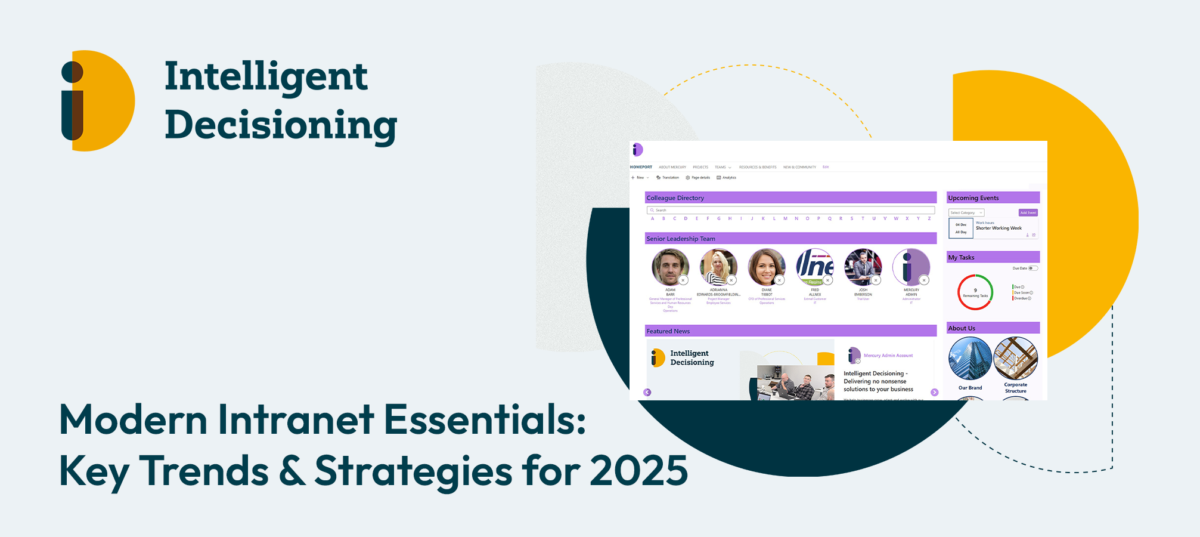
Modern Intranet Essentials: Key Trends & Strategies for 2025

The role of intranet solutions has never been more critical. Outdated systems can hinder productivity, leaving employees frustrated and disconnected. Modern intranets, however, are transforming how organisations collaborate, communicate, and thrive in an increasingly hybrid work environment.

Whether you’re a leader in IT, HR, or operations, understanding the latest trends and strategies in intranet solutions is essential to staying ahead.

Why Modern Intranets Are Crucial Today

Outdated intranet systems often fail to meet the demands of today’s workplaces. Key issues include:

  • Low Employee Engagement: Employees struggle to find relevant content or tools, leading to disengagement.
  • Limited Functionality: Traditional platforms lack the scalability and features needed for modern workflows.
  • Fragmented Communication: Siloed systems create barriers, making it harder to collaborate effectively.

Modern intranets, like Mercury, are designed to address these challenges. By streamlining information, enabling seamless collaboration, and offering intuitive user experiences, they provide businesses with the tools they need to succeed.

Key Trends Shaping Modern Intranets

The evolution of intranet solutions is being driven by several transformative trends:

1. Employee Experience (EX)

Intranets now prioritise user-friendly designs that empower employees to personalise their experience. Intuitive dashboards and easy-to-navigate interfaces improve productivity and satisfaction.

2. AI Integration

Artificial intelligence is revolutionising how intranets function. Smart search capabilities, AI-powered chatbots, and personalised content recommendations are helping employees access the right information quickly.

3. Mobile-First Approach

With hybrid and remote working becoming the norm, intranets must be accessible across devices. Responsive designs ensure employees can collaborate anytime, anywhere.

4. Enhanced Search Functionality

Employees spend valuable time searching for documents and data. Advanced search capabilities, powered by platforms like Microsoft SharePoint, make finding critical resources effortless.

5. Data Security and Compliance

As organisations handle sensitive information, robust security measures and compliance with regulations have become essential features of modern intranets.

Strategies to Maximise Intranet Success

To fully realise the potential of a modern intranet, organisations should adopt the following strategies:

1. Define Clear Objectives

An intranet should align with your business goals. Whether it’s improving communication or enhancing employee productivity, define measurable objectives from the outset.

2. Engage Employees

Involve your team during the design and implementation process. Regular feedback sessions and training programmes can boost adoption rates and ensure the system meets user needs.

3. Prioritise Customisation

One size doesn’t fit all. Tailored intranet features, such as MegaNav for enhanced navigation, ensure the platform caters to your unique organisational requirements.

4. Measure Impact

Use analytics tools to monitor engagement and identify areas for improvement. Metrics like page views, user feedback, and task completion rates can offer valuable insights.

Testimonial: Real-World Success

The success of our solutions is best captured in the words of our clients. Here’s what Oliver Tipper, Head of Communications at Leeds and York Partnership NHS Foundation Trust, had to say:


The team at ID have really proven themselves. They understand the needs of public sector intranets and have all the Microsoft SharePoint credentials. Their team worked alongside us throughout a long and hard process to achieve the results we needed. Our staff can now access the information they need from any device, anywhere, 365 days a year. Hence why we called our new site Staffnet 365. We are now being seen as trailblazers in the NHS provider intranet market for building our site within the NHS England SharePoint tenancy

Oliver Tipper, Head of Communications at Leeds and York Partnership NHS Foundation Trust

Modern intranet solutions are no longer a luxury; they’re a necessity for organisations aiming to thrive in an increasingly digital workplace. By leveraging the latest trends and implementing proven strategies, businesses can empower their teams, enhance productivity, and achieve long-term success. If you’re ready to transform your intranet, explore how we can help. From robust platforms like Mercury to expert customisation, we provide solutions that drive real results. Contact us today to learn more or request a demo.

Categories

SharePoint Intranet’s impact Information Management

Introduction

Organisations are constantly seeking ways to optimise workflows and enhance collaboration in today’s digital era. SharePoint, a powerful intranet system within the Microsoft ecosystem, has emerged as a cornerstone for achieving these goals. With its robust features, seamless integrations, and flexibility, SharePoint is transforming how businesses manage information and drive teamwork.

The Role of SharePoint Intranet in Digital Transformation

The shift towards digital workflows and remote working has underscored the importance of modern intranet systems. SharePoint provides a unified platform for document management, communication, and collaboration. It supports organisations in breaking down silos, fostering transparency, and enabling efficient information sharing.

Simplifying Collaboration with SharePoint

SharePoint offers a range of tools that simplify collaboration across teams and departments. Its integration with Microsoft Teams allows for real-time communication and document sharing, while features like version control and permission settings ensure secure and streamlined workflows. Teams can collaborate on documents simultaneously, reducing delays and improving productivity.

Centralised Information Management

One of SharePoint’s standout features is its ability to centralise information management. With libraries, metadata, and advanced search capabilities, SharePoint enables users to store, organise, and retrieve information effortlessly. Its document versioning feature ensures users always have access to the latest updates, eliminating confusion and errors.

Customisation and Flexibility

SharePoint stands out for its customisation options. Businesses can design intranets that reflect their branding and meet specific needs. With tools like the SharePoint Look Book, organisations can choose templates and web parts that align with their objectives, providing a user-friendly and visually appealing interface.

Integrating with Microsoft 365 for Enhanced Workflows

As part of the Microsoft 365 suite, SharePoint seamlessly integrates with tools like Power Automate, Outlook, and Planner. This integration enables organisations to automate repetitive tasks, create custom workflows, and manage projects more efficiently. For instance, a sales team can automate client onboarding processes using SharePoint and Power Automate, saving time and reducing errors.

Conclusion

SharePoint intranet systems are revolutionising how organisations approach collaboration and information management. By centralising data, enhancing communication, and supporting digital transformation, SharePoint empowers businesses to work smarter, not harder. Whether you’re a small business or a large enterprise, implementing a SharePoint intranet can drive efficiency and success.

Read more about our intranet system, Mercury, and how it can help you.

Categories

Transforming Workplaces: How Intranet Solutions Drive Employee Engagement

Employee engagement is critical for any organisation aiming to achieve long-term success. Engaged employees are more productive, innovative, and loyal, contributing significantly to a positive workplace culture. However, with the rise of hybrid and remote work environments, fostering engagement has become more complex. This is where intranet solutions come into play, offering a centralised platform to enhance communication, collaboration, and connection among employees.

Why Employee Engagement Matters

Employee engagement is directly linked to organisational performance. Studies have shown that engaged teams can lead to 21% higher profitability. On the other hand, disengaged employees often result in higher turnover rates and lost productivity.

The challenge lies in bridging gaps caused by geographical dispersion, communication silos, and a lack of recognition. Intranet solutions address these issues by creating a unified digital environment that brings teams together.

Key Features of Intranet Solutions That Boost Engagement

1. Enhanced Communication

An intranet serves as the backbone for efficient workplace communication:

  • Centralised Updates: Keep employees informed with announcements, policy updates, and news.
  • Real-Time Interaction: Tools like instant messaging, discussion forums, and video integration enhance connectivity.

By reducing the reliance on lengthy email threads, intranets ensure that information is easily accessible, fostering transparency.

2. Employee Recognition

Recognition plays a vital role in keeping employees motivated. Intranets support:

  • Celebrating Achievements: Highlight individual and team successes through public dashboards or newsletters.
  • Peer-to-Peer Praise: Enable employees to acknowledge each other’s contributions via shout-outs, badges, or virtual high-fives.

Creating a culture of appreciation enhances morale and encourages employees to go the extra mile.

3. Collaboration and Knowledge Sharing

Modern intranets are designed to facilitate seamless collaboration:

  • Centralised Knowledge Hubs: Store and share resources, documents, and training materials.
  • Project Collaboration: Tools like shared workspaces, task managers, and integrated calendars ensure alignment across teams.

By breaking down barriers to collaboration, intranets empower employees to work smarter, not harder.

4. Personalised Content and Engagement

Tailored experiences drive adoption and sustained use:

  • Custom Dashboards: Allow employees to personalise their intranet homepage with widgets relevant to their roles.
  • Interactive Features: Gamification, polls, and quizzes keep the experience engaging and fun.

These features make the intranet a valuable daily tool, not just an occasional resource.

Real-Life Example: Beyond Housing’s Intranet Transformation

Beyond Housing partnered with Mercury to modernise their outdated intranet. The new solution addressed several critical challenges, such as:

  • Enhanced Usability: Mercury’s user-friendly design made it easy for employees to navigate and access information.
  • Improved Collaboration: The platform provided tools to facilitate team collaboration across different locations.
  • Custom Features: Tailored functionalities, including news feeds and document management, ensured the intranet met specific organisational needs.

The results were transformative:

  • Increased employee satisfaction with the platform.
  • Enhanced communication and information sharing.
  • Greater adoption rates due to intuitive design and relevant content.

For more details on Beyond Housing’s success, read the full case study here.

Intranets are no longer just tools for storing information; they are strategic platforms for fostering employee engagement, improving communication, and building a cohesive workplace culture.

Categories

Intranet for HR: Streamlining Recruitment and Onboarding

Modern intranets are revolutionising HR functions by simplifying recruitment and enhancing onboarding processes. By centralising operations, improving accessibility, and fostering collaboration, intranets are becoming indispensable tools for HR teams across organisations.

1. Centralised Recruitment Resources

An intranet serves as a one-stop shop for managing recruitment. From posting job vacancies to tracking applications, intranets streamline the hiring process by integrating all tools into a unified system. Recruiters can collaborate effortlessly, manage candidate pipelines, and monitor progress through automated updates and shared dashboards.

2. Enhanced Onboarding for New Hires

A structured onboarding process is critical for setting employees up for success. With an intranet, businesses can:

  • Centralise Essential Documents: New hires can access policies, contracts, and employee handbooks directly, reducing delays caused by paperwork.
  • Automate Tasks: Assign tasks, track their completion, and notify stakeholders in real time.
  • Provide Personalised Learning Modules: Customised e-learning content, such as training videos or compliance courses, helps new employees integrate quickly while adhering to company standard.

3. Encouraging Collaboration and Communication

Intranets act as hubs for internal communication, promoting transparency and engagement. Tools such as team chat platforms, discussion forums, and digital directories ensure HR teams and managers stay connected with recruits throughout their onboarding journey. Social elements, like welcome announcements or digital introductions, help build a sense of community.

4. Empowering Employee Self-Service

HR intranets can include self-service features, enabling employees to manage routine tasks independently. These might include updating personal information, accessing payslips, or requesting leave. By reducing dependency on HR staff for minor queries, teams can focus on more strategic tasks while improving the overall employee experience.

5. Performance Monitoring and Insights

Intranets offer data tracking and analytics capabilities, which HR teams can use to evaluate the effectiveness of recruitment and onboarding efforts. For instance, tracking new hire retention rates or time-to-productivity metrics allows for continuous improvement, ensuring that the organisation attracts and retains top talent.

Why Invest in an HR Intranet?

An intranet simplifies complex HR processes, fosters collaboration, and enhances efficiency. By leveraging its full potential, organisations can:

  • Reduce Costs: Automate repetitive tasks and minimise manual intervention.
  • Boost Engagement: Facilitate seamless communication and transparent processes.
  • Improve Retention: Ensure new hires have the resources they need to thrive from day one.

A user-friendly design, mobile compatibility, and integration with existing tools are critical to maximising the benefits of an intranet. For HR teams, adopting such a platform is not just a technological upgrade but a strategic move to stay competitive in today’s talent-driven market.

Categories

The Role of AI in Modern Intranet Solutions for Organisations

Introduction

The evolution of intranet solutions has been rapid, moving from simple, static information repositories to dynamic, user-centric platforms. As businesses strive to enhance productivity and employee engagement, the integration of Artificial Intelligence (AI) into intranet systems has become a game-changer. This blog explores the transformative impact of AI on modern intranet solutions, highlighting its role in enhancing user experience, streamlining workflows, boosting collaboration, improving data security, and providing predictive analytics.

Enhancing User Experience

Enhancing User Experience

AI personalises the intranet experience by tailoring content to individual user needs. By analysing user behaviour, AI ensures that employees see relevant news, updates, and resources, enhancing engagement. AI-driven content recommendations further ensure that users receive pertinent information based on their roles and interests. Enhanced navigation and AI-driven search capabilities help users find what they need quickly, improving overall satisfaction.

Streamlining Workflows

Streamlining Workflows

AI automates routine tasks, reducing manual effort and minimising errors. This includes automating data entry, document classification, and workflow routing, enabling employees to focus on more strategic tasks. AI in document management improves search and retrieval processes, making it easier to access vital information.

Boosting Collaboration

AI-powered chatbots provide real-time assistance, facilitating seamless communication and collaboration among employees. These chatbots can handle common queries, guide users through processes, and ensure that teams stay connected and productive. AI also enhances document sharing, ensuring that employees have access to the latest versions and can collaborate effectively.

Improving Data Security and Compliance

AI plays a crucial role in data protection by monitoring access patterns and flagging suspicious activities. Automated controls ensure compliance with regulatory standards, safeguarding sensitive information. This proactive approach to security helps organisations maintain trust and compliance with ease.

Predictive Analytics and Insights

AI leverages advanced analytics to provide valuable insights from intranet data. Predictive analytics help organisations make proactive decisions, identify trends, and optimise operations. These insights can drive strategic initiatives and improve overall business performance.

Conclusion

Integrating AI into intranet solutions offers numerous benefits, from personalising user experiences and streamlining workflows to enhancing collaboration and ensuring data security. By embracing AI, organisations can transform their intranet systems into powerful tools for productivity and innovation, paving the way for a more efficient and collaborative workplace.

Categories

Integrating AI into Document Management: Enhancing Efficiency and Accuracy 

As digital transformation reshapes modern workplaces, businesses increasingly seek ways to streamline operations and improve precision. Document management is a critical area benefiting from these advances, as companies deal with ever-growing volumes of data. Integrating artificial intelligence (AI) into document management systems offers powerful solutions for enhancing efficiency and accuracy. From automating repetitive tasks to optimising data retrieval, AI is transforming the way organisations manage, store, and access information. 

The Benefits of AI in Document Management 

Integrating AI into document management brings a range of benefits, from reducing human error to accelerating processes. Here’s how AI is enhancing document management: 

  1. Automated Document Processing: Traditional document management often requires manual data entry, tagging, and organisation. AI algorithms can automate document processing by automatically classifying, tagging, and categorising documents based on content. This not only saves time but also reduces the chance of misfiling. 
  1. Enhanced Data Extraction and Indexing: With advanced machine learning algorithms, AI can read, analyse, and extract relevant information from documents. This enables better data indexing, making it faster and easier to retrieve specific documents based on keywords or contextual details. 
  1. Improved Search and Retrieval: AI-powered document management systems offer intelligent search features that understand the context and nuances of search queries. Using natural language processing (NLP), AI can locate relevant documents even if users don’t remember exact filenames or tags, making information access quicker and easier. 
  1. Document Security and Compliance: Given the sensitivity of data within documents, security is paramount. AI tools monitor document access patterns, detect anomalies, and bolster security protocols, ensuring compliance with data protection regulations. For example, AI can automatically identify and redact sensitive information, protecting it from unauthorised access. 
  1. Streamlined Document Approval Processes: Many industries rely on document workflows that require multiple approvals. AI can automate workflow steps, such as sending notifications, tracking approvals, and ensuring documents progress through each stage efficiently. This automation significantly reduces delays, especially for companies dealing with high volumes of documentation. 

Key Applications of AI in Document Management 

AI’s integration into document management proves beneficial across a variety of applications: 

  1. Intelligent Document Classification: AI algorithms analyse document content and automatically assign categories based on learned patterns, a process known as intelligent document classification. This is invaluable for sectors like healthcare or legal services, where rapid access to specific document types is crucial. 
  1. Automated Data Extraction: AI recognises data patterns within documents, extracting specific information, such as dates, numbers, names, and addresses. Industries like finance particularly benefit from automated data extraction, which speeds up reporting and analysis. 
  1. Predictive Analytics and Insights: Beyond organisation, AI in document management can analyse past document usage patterns to predict future trends. For example, AI can highlight frequently accessed documents, anticipate peak usage times, and provide insights that help improve resource allocation. 

How to Successfully Integrate AI into Document Management 

  1. Assess Your Document Management Needs: Start by evaluating current document workflows and identifying problem areas. Are there processes that are time-consuming or prone to error? AI integration can be most impactful where automation could deliver significant time or cost savings. 
  1. Choose the Right AI Tools: Select AI tools that align with your document management goals. For instance, if your organisation deals with large volumes of unstructured documents, choose tools with strong NLP capabilities to enhance search and retrieval. 
  1. Train AI Models with Quality Data: AI models rely on data to learn and improve over time. Start by training AI tools with high-quality sample data to ensure accurate classification and tagging. Regular fine-tuning of AI models using real-time data will further improve their performance. 
  1. Monitor and Optimise: As with any technology, ongoing monitoring is essential. Track the performance of your AI-driven document management system, gather user feedback, and adjust AI algorithms as needed to meet evolving organisational requirements. 

The Future of Document Management with AI 

AI’s role in document management is set to expand as organisations realise the benefits of increased efficiency and accuracy. Emerging technologies, such as deep learning and advanced natural language processing, will continue to improve AI’s ability to interpret and process complex documents. We can expect more sophisticated AI tools capable of understanding context, making decisions, and continually adapting to new data and workflows. 

For companies looking to remain competitive, investing in AI-powered document management is a strategic step towards digital transformation. With the right approach, organisations can leverage AI to boost productivity, improve accuracy, and ensure security across document management processes, ultimately achieving better business outcomes. 

Categories

Best Practices for Document Control & Management 

The importance of effective document control and management cannot be overstated. Whether you’re a small business or a large corporation, proper handling of documents ensures compliance, enhances efficiency, and protects sensitive information. Here are some best practices to help you stay on top of your document game. 

Establish Clear Naming Conventions 

One of the foundational steps in document management is establishing clear naming conventions. This ensures that files are logically organised and easy to find. Consistent naming should include relevant details such as consistent department and project names. For example, a file name like “ProjectX_DesignDoc1” immediately tells you the project and  document type. 

Centralise Document Repositories 

A centralised document repository is key to ensuring that all documents are accessible from a single location. This not only streamlines access but also reduces the risk of losing critical files. Whether you use cloud-based solutions or local servers, centralising your documents helps maintain order and accessibility. 

Implement Version Control 

Version control is crucial in tracking changes and maintaining document integrity. This practice allows you to keep a history of document revisions, ensuring that you can revert to previous versions if needed. Implementing a robust version control system helps prevent confusion and ensures that everyone is working with the latest document version. 

Ensure Document Security 

Security is a top priority in document management. Implementing access controls, encryption, and regular security audits can help protect sensitive information. Ensure that only authorised personnel have access to specific documents and that your practices comply with regulatory requirements. Maintaining document security is essential for safeguarding against data breaches and ensuring compliance. 

Optimise Document Retrieval and Storage 

Efficient retrieval and storage are critical for maintaining productivity. Organise documents in a way that makes them easy to retrieve when needed. This includes tagging documents with relevant keywords and using metadata to enhance searchability. Additionally, consider archiving older documents to free up space and keep your repository manageable. 

Utilise Technology for Enhanced Efficiency 

Leveraging technology can significantly improve your document management practices. Document management systems (DMS) offer features like automated workflows, version control, and secure access. When choosing a DMS, consider factors like ease of use, scalability, and integration with existing systems. Utilising the right technology can streamline processes and enhance overall efficiency. 

Train Staff and Assign Administrators 

Proper training is essential for effective document control. Ensure that all staff members are familiar with document management practices and know how to use the tools available to them. Designate administrators who are responsible for overseeing document management and ensuring compliance with established procedures. Training and assigning roles help maintain consistency and accountability. 

Develop Key Metrics for Continuous Improvement 

To measure the effectiveness of your document management system, develop key metrics such as retrieval time, error rates, user satisfaction, and compliance rates. Regularly review these metrics to identify areas for improvement and adjust your practices accordingly. Continuous improvement ensures that your document management processes remain efficient and effective. 

FAQs 

What is document control and why is it important? Document control is the process of managing documents to ensure they are accurate, up-to-date, and accessible. It ensures compliance with regulations, enhances efficiency, and protects sensitive information. 

How do I create effective naming conventions for documents? Effective naming conventions should be logical, consistent, and easy to follow. Include key information such as dates, project names, and version numbers to make documents easily identifiable. 

What are the benefits of using a document management system (DMS)? A DMS helps streamline document management by providing features like version control, secure access, and easy retrieval. It enhances efficiency, reduces errors, and ensures compliance with regulatory requirements. 

How can I ensure the security of my documents? Use access controls, encryption, and regular audits to protect documents. Ensure that only authorised personnel have access to sensitive information and comply with relevant regulations. 

What metrics should I track to measure the effectiveness of my document management system? Track metrics such as retrieval time, error rates, user satisfaction, and compliance rates. Use these metrics to identify areas for improvement and optimise your document management processes. 

Conclusion

In summary, effective document control and management are essential for ensuring compliance, enhancing efficiency, and protecting sensitive information. By following these best practices, you can create a robust document management system that meets the needs of your organisation. Implement these strategies to stay organised, secure, and ready for any challenge.