Categories

4 Major Advantages of an Intranet for Your Business

Let’s dive right in. How does an intranet solution accelerate business performance and make your company better? Here’s a look at 4 major intranet advantages:

1. Improved Communication and Collaboration

An intranet solution’s ability to promote staff cooperation and communication is one of its biggest benefits. Effective communication is the foundation of productivity in every kind of organisation. A centralised platform that facilitates easy communication, idea sharing, and project collaboration is offered by an intranet.

An intranet dismantles the organisational walls that can occur in businesses using tools like instant messaging, forums, and collaborative workspaces. Workers in other departments or even in different places may readily connect and collaborate in real-time. This improves collaboration and speeds up the decision-making process, which eventually results in higher output and more creativity.

2. Simplified Exchange of Information

Having timely access to the appropriate information is essential in any organisation. The central location for all company-related policies, knowledge bases, and documents is provided by an intranet. Employees don’t have to go through many emails or antiquated file systems to obtain the information they want, whether it’s HR policy, training materials, or project documents.

An intranet usually has strong search capabilities that make it easy for staff members to find files, papers, and conversations. This improved information availability minimises mistakes, cuts down on downtime, and guarantees that all employees have access to the most recent data. Additionally, this structured method of exchanging information facilitates compliance and lowers the possibility of misinterpretation or data breaches.

3. Improved Retention and Engagement of Employees

Each company’s ability to retain its workforce is essential to its success. Employees are more likely to be driven, effective, and devoted when they have a sense of belonging to the company and its goals. By giving staff members, a forum to participate in conversations, celebrate successes, and learn about corporate news, intranet software plays a big part in building this relationship.

An intranet fosters a feeling of community at work with features like social networking tools, employee appreciation programs, and news feeds. Workers may connect more openly and transparently with leadership, discuss their accomplishments, and provide feedback. Higher work satisfaction because of this greater involvement boosts employee retention and lowers turnover expenses.

4. Enhanced Productivity and Economic Benefits

Significant cost reductions and operational efficiency might result from the use of intranet software. Businesses may minimise total IT costs by eliminating the need for numerous subscriptions and licenses by combining disparate technologies and platforms into a single, integrated solution. Workflows and task management, two automation capabilities included in intranet software, also simplify repetitive tasks and lessen the administrative load on staff members.

For instance, when all required documents, training materials, and resources are easily accessible on the intranet, the onboarding process for new hires runs more smoothly. Like this, having shared workspaces, task assignments, and schedules all on one platform streamlines project management. These efficiencies provide workers more time to devote to higher-value, more strategic duties.

Investing in a strong intranet system is a wise decision that may provide significant long-term advantages as firms continue to adjust to the changing digital world.

Categories

How Intranet Systems Help Employers Retain Remote Staff 

As more and more businesses are adopting hybrid work arrangements, it has become essential to give staff members a positive work atmosphere to lower the likelihood that they leave. Excessive employee turnover can negatively affect team culture, morale, and productivity. It can also worsen communication hurdles and cost money and time to hire and educate new workers. 

Considering this, how can you maintain your remote workers’ happiness in the modern digital workplace? We offer our best advice on how intranets, such as Mercury, with modern intranet features, can increase employee retention for remote and hybrid workers. 

Provide Effective Systems 

During the pandemic, a lot of companies hurried to set up remote working systems and  if you’re still utilising them four years later, it’s time for an evaluation. 

The inability of remote workers to share skills, discover information or access systems, or effectively communicate with coworkers can be extremely frustrating daily. These issues can have a significant negative influence on worker happiness. 

Mercury is an online gathering place for remote teams to enhance team culture, accessibility, productivity, and communication.  

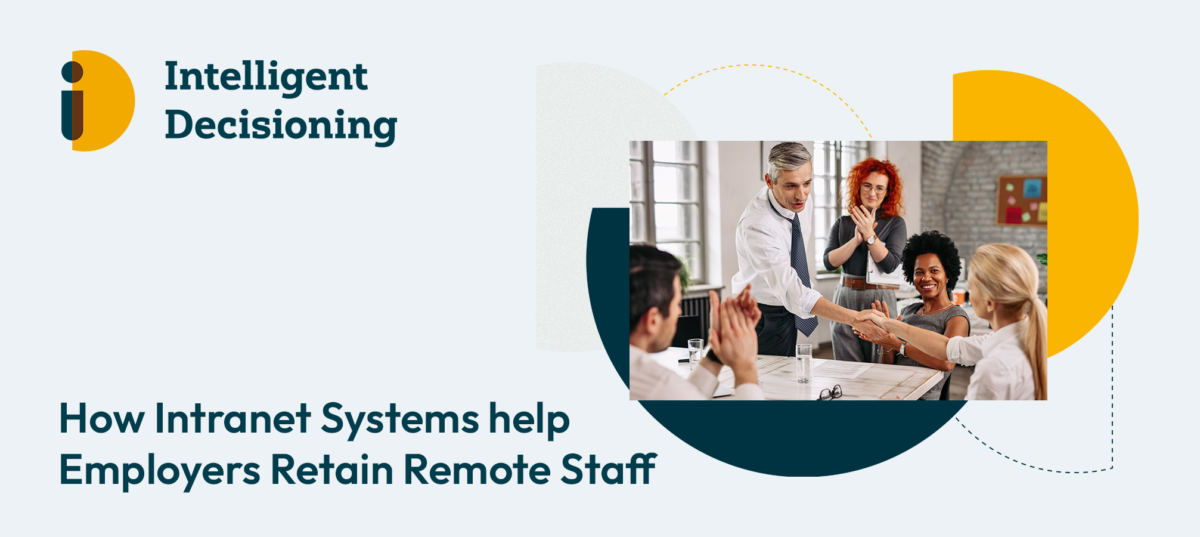
Two happy business people shaking hands on a meeting while other colleagues are applauding them in the office.

Encourage Good Health 

The benefits of working remotely, such as shorter commutes, flexible schedules, and more time for completing tedious life admin tasks, are frequently touted by remote workers. However, companies need to be aware of the drawbacks of remote work, such as spending a lot of time in front of a screen and having little opportunity to engage with actual people. 

Encouraging good health and wellbeing can lower employee sick days, increase worker retention, and result in a happier, more productive workforce. 

Establish a Successful Remote Culture 

Building a strong team culture is essential to assembling a contented workforce of employees as high staff turnover can negatively affect morale. With social and news features that will revolutionise your remote team culture, such as a private company social media feed with the option to “like” and “comment” on posts, pinned posts for sharing important news, interactive staff profiles and skills directory, and organisational calendar, Mercury is here to bring people together and assist businesses in reducing a lack of communication. 

Fight Digital Burnout 

For remote workers, who spend a lot of time in front of screens and may form negative habits like checking work notifications after hours, it is imperative to take digital wellbeing into account. Digital burnout can lead to a bad working environment, poor physical and mental health, and an impact on wellbeing, productivity, and sleep. 

Talk to your staff about their usage of technology, establish policies for appropriate behaviour, and give them resources to help them balance work and screen time.  

Encourage Feedback 

It may be more difficult to gauge your remote workers’ degree of job satisfaction, and if you don’t know about any issues, they might quit before you have a chance to make any changes. Honouring a team member’s accomplishment or achievement has a positive effect on morale and makes remote workers feel important. 

Creating an employee engagement survey can be made simple with Mercury, which lets staff members share their thoughts, queries, and issues. This helps you understand your team better and boosts employee engagement. 

Are you interested in learning more about how Mercury helps increase employee retention and morale among remote teams? For a risk-free, no-obligations demo, please contact us. 

Categories

Four Reasons You Need Document Management With docCentrum

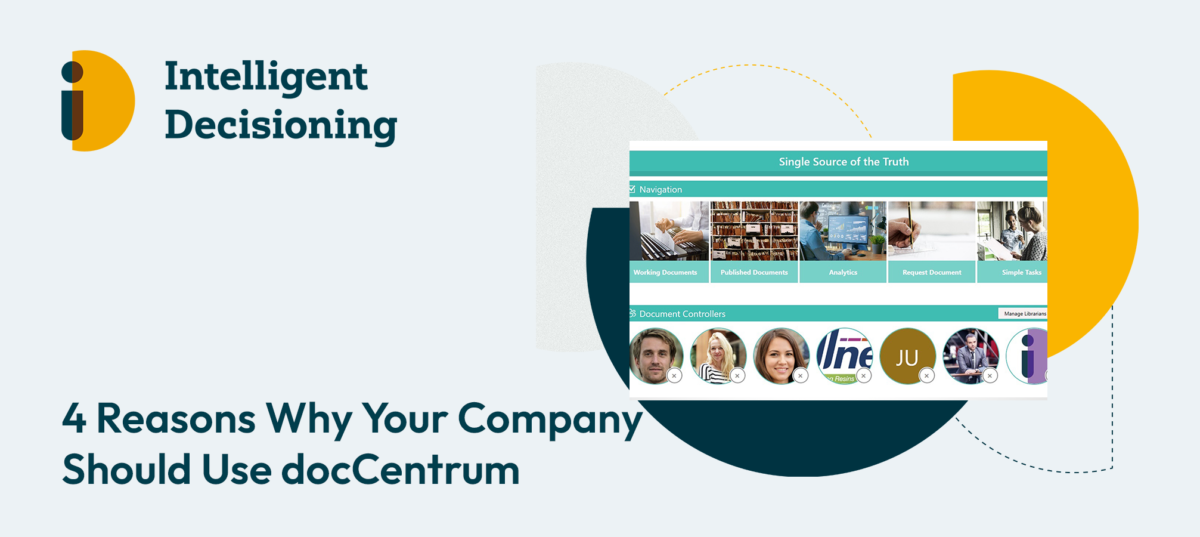
Organisations struggle to improve cooperation, streamline procedures, and provide strong protection for their sensitive data. Our world class document management system, docCentrum, is built to transform document management with a feature set that may improve productivity, efficiency, and compliance throughout your company. The following four strong arguments support the idea of incorporating docCentrum into your organisational structure:

1. Safe Document Administration

Protecting sensitive data is essential in the age of data breaches and cyberthreats. By combining all your papers into one safe spot, docCentrum offers a safe sanctuary for them. Strong user permissions are used by the system to limit access according to roles and responsibilities. docCentrum uses encryption techniques to strengthen the defence, guaranteeing the integrity and security of your most important data.

2. Effective Workflow Management

Success in a company is largely dependent on efficient task management. docCentrum makes it easy for team members to give tasks to one other and monitor their progress, which promotes smooth communication. The software makes sure that deadlines are completed by allowing users to establish due dates and reminders. When a job is finished, users receive timely alerts, which encourages a proactive and structured approach to workflow management. 

3. Interactive Learning Assessments

Improving staff understanding and knowledge is an ongoing effort. docCentrum incorporates interactive learning evaluations, which elevates it above typical document management. Organisations can monitor users’ comprehension of texts over time by administering quizzes to them. The platform provides useful measures for improving training programs and guaranteeing that important material is assimilated efficiently. It also offers informative reports on user performance.

4. Improved Compliance Training

Maintaining compliance with industry rules is a never-ending task. By offering strong capabilities to track document evaluations and retention, docCentrum lessens this load. The platform provides a clear picture of adherence to regulatory standards and enables companies to create complete reports on compliance status. Users may take a proactive and educated approach to regulatory compliance by being advised of impending compliance deadlines through automated alerts.

In the field of document management, docCentrum stands out as a game-changer because it provides a comprehensive solution that solves security issues, improves task management, elevates learning evaluations, and simplifies compliance training. Your company may adopt a more effective and secure approach to document management by using docCentrum, opening the door for long-term success in the fast-paced business climate of today.

Categories

Five Ways Intranet Solutions Can Help HR Departments

Human Resources (HR) departments are essential to the management of an organisation’s most precious asset, which is its people, in the fast-paced commercial world of today. Many businesses are using intranet software to boost communication, employee engagement, and HR process efficiency. Intranet solutions offer a centralised, secure environment for information exchange, teamwork, and access to critical HR resources.

Employee Information Management in One Place

The upkeep and management of employee data, including personal information, employment history, perks, and performance reviews, is the primary duty of HR. HR can create a single digital repository for all employee data thanks to intranet software. This eliminates the need for paper documents and guarantees easy access to data and real-time modifications. Using this technology, HR can quickly obtain important data, which lowers administrative burden and improves data accuracy.

Simplified Procedures for Onboarding and Offboarding

Effective onboarding and offboarding processes are essential to a seamless and well-coordinated employee experience. In this sense, intranet software serves as a bridge by providing new personnel with access to vital resources and data, such as corporate regulations, training materials, and contact details. On the other hand, HR can easily manage exit interviews, asset recovery, and system access cancellation during offboarding, making sure that leaving staff members have a smooth transition.

Self-Service Empowerment of Employees

One of the main advantages of intranet software is that it empowers staff members to handle their HR-related responsibilities. HR can set up self-service portals where workers can update personal data, seek leaves, examine pay stubs, and get benefit information. This reduces HR’s administrative workload while simultaneously giving staff members greater control over their HR-related duties, which raises employee satisfaction and engagement levels.

Encouraged Interaction and Better Participation

HR departments must communicate effectively to disseminate critical information, such as revisions to policies, corporate news, and benefit changes. HR may set up and maintain internal communication channels including discussion boards, forums, and news feeds with the use of intranet software. HR may also utilise the intranet to poll staff members and get their input, which will increase engagement and enhance the working environment.

Excellence in Training and Development

Continuing to train and develop employees is crucial to having a staff that is competitive. Resources for skill development, e-learning courses, and training modules may all be delivered via intranet software. HR may monitor training completion, keep tabs on staff advancement, and pinpoint areas in need of development. This improves worker capabilities and unites the staff with the strategic goals of the organisation.

In summary, intranet has developed into a useful tool for HR departments, allowing them to increase employee engagement, optimise workflows, and improve communication. HR can manage the organisation’s human capital more effectively and efficiently by centralising employee data, streamlining the onboarding and offboarding process, encouraging employee self-service, fostering communication, and funding training and development. HR departments that make use of intranet software will be better prepared to handle the demands of the workplace of the future as organisations continue to change.

Categories

Why Custom Azure Development Could Be the Solution Your Business Needs

Businesses are continuously looking for methods to improve efficiency, simplify processes, and remain ahead of the competition in today’s fast-paced digital market. Custom Azure development is a potent means of accomplishing these objectives. Through the utilisation of Microsoft Azure’s extensive capabilities, enterprises may develop customised solutions that fulfil their specific requirements and yield noteworthy advancements.

The Potential of Custom Azure Development

There are numerous advantages of custom Azure development that might transform your company’s operations:

1. Scalability: Without requiring large upfront hardware expenditures, Azure’s cloud platform enables organisations to develop without difficulty by scaling their applications.

2. Security: Azure offers cutting-edge security measures and compliance certifications that guarantee the safety of your data.

3. Cost-Effectiveness: With Azure’s flexible pricing structures, you only pay for what you use, cutting down on extra costs.

4. Integration: You may link Azure’s extensive suite of services and capabilities with your current systems to improve functionality and productivity.

5. Innovation: To spur innovation and maintain competitiveness, make use of cutting-edge technology like Artificial Intelligence (AI), machine learning, and Internet of Things (IoT).

Impact in the Real World: Birmingham Assay Office

Our work with the Birmingham Assay Office is a perfect illustration of how bespoke Azure development can alter an organisation. The Birmingham Assay Office was founded in 1773 and has a long history of protecting customers with cutting-edge testing and certification services. They had to modernise their hallmarking technique, though, to meet the needs of the digital era. We were able to optimise their processes, decrease human labour, integrate their workflow-based system with their billing platform for precise and error-free invoicing by creating a customised digital workflow solution with Azure.

Schedule a Free Consultation

Are you prepared to discover how bespoke Azure development can transform your company for the better? Schedule a free consultation with us right now to find out how we can work with you to create a solution that will match your specific needs and help your company grow.

Categories

Intelligent Decisioning Maintains ISO 9001 Certification!

We are pleased to announce that Intelligent Decisioning is still upholding the strict requirements of ISO 9001 certification, which confirms our commitment to providing the best possible goods and services. Our continuous dedication to excellence in quality management, which guarantees that we constantly meet and surpass our clients’ expectations, is demonstrated by this accreditation.

What is ISO 9001?

The widely acclaimed ISO 9001 standard describes the requirements for a quality management system (QMS). It is centred around several important ideas, including a strong emphasis on the needs of the customer, senior management engagement, a process-driven methodology, and a dedication to ongoing development. The goal of the standard is to guarantee that businesses can reliably deliver products and services that satisfy consumers and legal obligations, improve customer satisfaction, and promote continual development in all functions.

The Role of docCentrum in Our Quality Management

Our world-class document management technology, docCentrum, provides significant assistance for our continuous compliance with ISO 9001 requirements. docCentrum offers us with a reliable platform for streamlining our documentation procedures, ensuring that our quality management records are always up-to-date, precise, and easily accessible. This has been crucial in ensuring that we meet the rigorous ISO 9001 requirements. Furthermore, docCentrum has helped us achieve ISO 27001 accreditation, which is focused on information security management.

What This Signifies for Our Customers

Keeping our ISO 9001 accreditation current demonstrates our unwavering commitment to quality. Our customers may still rely on us to provide them with high-quality, dependable, and efficient products and services. Our clients are additionally reassured by the constant certification that we are always improving our procedures to better serve their needs.

We have a solid basis for information security and quality control with docCentrum. This dual emphasis gives our clients peace of mind and trust in our services by guaranteeing that every facet of our operations is in line with the strictest industry standards.

Our Unwavering Dedication to Excellence

Although we are proud to have kept our ISO 9001 accreditation, we understand that this is only one step in our continuous pursuit of excellence. We are still dedicated to improving our services, streamlining our procedures, and maintaining the high standards that have allowed us to get this esteemed certification.  As a team, we’ll keep up the wonderful work and uphold the standards that have made our business a leader in security and quality.

Categories

Transform Your SharePoint Navigation with MegaNav 

Intelligent Decisioning is thrilled to announce the launch of MegaNav, the ultimate solution for enhancing your SharePoint experience. MegaNav redefines how you navigate and manage your SharePoint environment, offering a mix of simplicity, style, and functionality. 

Why MegaNav? 

1. Effortless Customisation

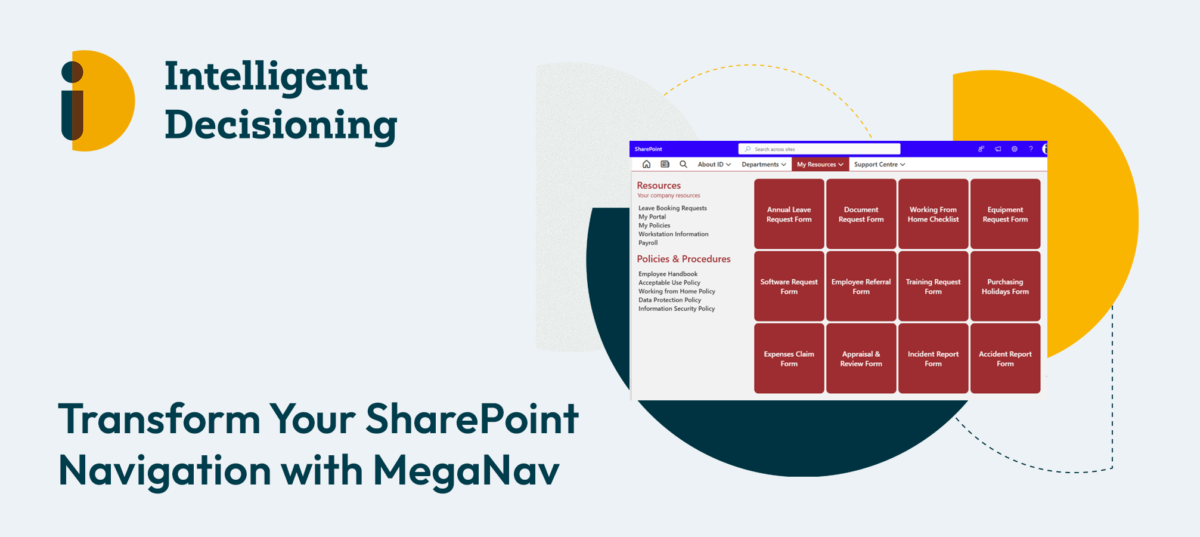
Customise your navigation with ease using intuitive drag-and-drop features and adjustable font settings. Tailor headers, links, and tiles to perfectly match your branding—no technical skills needed. 

2. Attractive Visuals:

Enhance your navigation menus with eye-catching images and vibrant block colour tiles. Add graphical icons to make your navigation both functional and visually pleasing. 

A screenshot of a computer

Description automatically generated

3. Seamless Mobile Support:

Stay productive on the go. MegaNav’s mobile compatibility ensures you can access your SharePoint environment anytime, anywhere. 

4. Consistent Navigation:

Achieve uniformity across your SharePoint Hub hierarchy with hidden Hub Navigation for a cleaner look!  

MegaNav makes navigating your SharePoint environment, with hubs and associated sites, a breeze. Creating beautiful navigations is simple with intuitive drag-and-drop activity—no need for developers, and no need to edit fiddly XML or JSON. The Intelligent Decisioning MegaNav is a standalone SharePoint solution, but if you already have Mercury Intranet, MegaNav integrates perfectly with it. It also works seamlessly with Intelligent Decisioning document control and compliance solution, docCentrum

Book a free demo! 

If you’d like to know more about MegaNav, Mercury Intranet, or docCentrum, then book a demo at id-live.com. 

Categories

Build Intelligent, Scalable Solutions with Microsoft Power Platform

Technology is undergoing a revolutionary period right now, propelled by developments in artificial intelligence (AI) and a move towards more contemporary software development paradigms. Businesses must keep up with the speed of business improvement which Low-Code development brings as it becomes more and more integrated into our everyday work. To fulfil the increasing demand for AI-enabled products, traditional software development methodologies are no longer sufficient. Let’s introduce you to Microsoft Power Platform, a low-code powerhouse that is revolutionising programming in the AI age.

The Evolution of Low-Code

For many knowledge workers today, the integration of AI into corporate processes is a reality. According to a recent survey, 75% of these employees use AI technologies in their jobs, yet 60% of organisational executives are concerned about how well they will be able to use AI. Low-code development platforms are becoming more and more popular because of the rising need for AI solutions.

One unique low-code option offered by Microsoft Power Platform is its ability to swiftly and efficiently construct Apps, Automations, Data Visualisations and intelligent ChatBots with very little code. In addition to being effective, this method frees up engineers to concentrate on high-value work while utilising AI and data to spur creativity.

AI-Powered Development Using Microsoft Power Platform

Leading the way in the integration of AI into the development process is Microsoft Power Platform. Since Microsoft Copilot was released, the platform has completely changed the way apps are created. Copilot helps developers with every stage of the app development process, from ideation to release. More than 330,000 organisations have previously used this technology, demonstrating its positive effects on efficiency and production.

Developers may start by describing their program in Power Apps, for example, and Copilot can recommend tables and data structures based on what it hears. The smooth transition between point-and-click and code-based methods is ensured for developers by this fusion of natural language and visual editing. By expediting development processes, Copilot also increases productivity. According to users, this has resulted in a 60% increase in building speed and a doubling of speed in Power Automate.

Building Scalable Solutions

One of the primary advantages of Microsoft Power Platform is its scalability. Built on Microsoft Cloud and Azure, it provides enterprises with sophisticated capabilities to manage and secure their apps, data, and environments. This scalability is evident in the success stories of big enterprises that have exploited the platform to drive innovation and realise considerable cost reductions.

Take Deutsche Bahn (DB) Group, for example. As Europe’s leading train infrastructure operator, DB leverages Microsoft Power Platform to boost innovation and manage large-scale adoption. Similarly, Centrica, a large energy services provider, has installed over 800 business solutions to support 15,000 users. Pacific Gas and Electric (PG&E) has realised major operating cost reductions and efficiency increases utilising the platform.

Comprehensive Governance and Security

Microsoft Power Platform is designed to serve the complex demands of enterprise-scale operations. It includes tools for establishing and maintaining various environments at different lifecycle stages, automating developer onboarding, and implementing policies to limit access and resources. Administrators may also monitor and audit application performance, automate lifecycle management, and interface with other Microsoft products like Azure, Microsoft 365, and GitHub.

The latest connection with Azure DevOps Git repository significantly enhances the development experience, allowing both professional and citizen developers to collaborate effortlessly utilising shared procedures and workflows.

Power Platform emerges as a vital tool for enterprises trying to innovate and improve their business processes. For a small company such as a cafe, this could be creating an app which logs inventory and stock, to then be able to quickly see what needs ordering, or for a large company such as a global vehicle rental company, this could be creating a fully integrated vehicle GPS tracking system, with links to third party software, email notifications, and data analytics. This can all be done combining the tools that the Microsoft Power Platform Brings 

Wrapping it up

As we navigate the AI-driven environment of modern software development, Microsoft Power Platform emerges as a vital tool for enterprises trying to innovate and stay competitive. Its low-code approach, paired with significant AI capabilities, delivers a simplified development process that fits the expectations of the AI age. Whether you are a seasoned developer, a citizen developer, or an enterprise leader, Microsoft Power Platform delivers the tools and flexibility needed to build intelligent, scalable solutions that drive business success.

Embrace the future of development with Microsoft Power Platform and uncover the power of AI to revolutionise your business.

Categories

Improved Departmental Collaboration Through Intranet Solutions

Intranet solutions provide a private, secure network where employees can access data, work together, and communicate effectively. They serve as the digital spine of a business. Organisations may establish a cohesive working culture and optimise business processes by skilfully utilising intranets. Let us explore the ways that intranet solutions help different departments:

Marketing Department

By centralising campaign materials, performance indicators, and brand assets, intranet systems empower marketing teams. How to do it is as follows:

Brand Assets: Marketing experts can quickly and easily obtain creative assets, brand guidelines, and logos from a single source, guaranteeing brand coherence throughout all media. In addition to saving time, this unified repository reduces the possibility that out-of-date or inaccurate materials may be utilised in campaigns.

Collaboration on initiatives: Intranets make it easy for team members to work together on marketing initiatives by letting them exchange ideas, monitor developments, and give immediate feedback. This cooperative setting fosters innovation and guarantees that all team members agree with the objectives and schedule of the campaign. Coordination of complicated campaigns is further streamlined by features like shared calendars, project management tools, and discussion forums.

Analytics Dashboards: Marketing managers may track campaign success and make data-driven choices with the help of customised dashboards. Through direct intranet integration of analytics, management may promptly evaluate the efficacy of various tactics, pinpoint opportunities for enhancement, and modify plans as needed. This real-time data access improves agility and aids in marketing strategy optimisation for increased return on investment.

Sales Department

Real-time information and smooth communication are essential for successful sales teams. Intranet solutions aid in sales in several ways.

Lead management: To convert leads into customers more effectively, sales staff may track client interactions, retrieve lead databases, and work together with colleagues. Sophisticated CRM systems that are incorporated into the intranet may track customer journey phases, automate lead assignment, and offer insightful data on customer behaviour.

Product Data: Intranets function as a thorough archive for product data, costs, and marketing materials. Sales teams are better equipped to complete deals when they have fast access to the most up-to-date product information, which guarantees them of providing accurate and compelling information at all times.

Sales Playbooks: Tailor-made sales playbooks lead agents through a range of situations, enhancing uniformity and effectiveness in sales presentations and client contacts. These playbooks, which are readily available via the intranet and may serve to standardise the sales process and enhance results, can contain case studies, best practices, and strategies for resolving objections.

Human Resources

Human Resources (HR) departments need effective communication channels since they manage sensitive employee data. Intranet systems offer some noteworthy benefits.

Employee Self-Service: By enabling workers to independently study corporate regulations, request time off, and access personal information, employees lessen the administrative load on HR personnel. Employee empowerment, increased happiness, and more time for HR to devote to strategic projects are all facilitated by this self-service feature.

Onboarding and Training: HR can set up specific onboarding portals that include FAQs, training materials, and necessary paperwork. By streamlining the onboarding process, these portals make sure that new workers have access to all the materials they need to become productive right away. Interactive features like discussion boards, tests, and video lectures can improve new hire engagement and retention.

Announcements and Policies: HR managers may use the intranet to distribute announcements to the whole organisation as well as revisions to corporate policies, making sure that every employee is informed and following the rules. It is ensured via this centralised communication route that critical information is dispersed effectively and consistently throughout the organisation.

Finance Department

Process simplification and data security are critical for finance teams. Finance-related intranet solutions are supported by:

Expense Reporting: By allowing staff members to submit reports online, the organisation can ensure policy compliance and improve financial transaction transparency. Workflows that are automated can expedite the approval process and cut down on mistakes and delays.

Financial papers: Finance professionals may more easily maintain and access important papers thanks to intranets, which securely store financial statements, budget reports, and tax-related data. Access controls improve data security by ensuring that only authorised individuals have access to sensitive information.

Cooperation with Auditors: Finance teams may ensure compliance with financial requirements and streamline audits by securely sharing relevant documents with auditors. Additionally, audit trails and logs may be hosted on the intranet, offering a visible record of financial

Departmental efficiency is increased, communication is improved, and cooperation is fostered through intranets. Through the appropriate use of intranet solutions, organisations may foster a cohesive workplace culture, optimise corporate processes, and stimulate overall expansion. Intranets are essential tools in today’s digital workplace, whether they are used by the marketing team to centralise brand assets, sales representatives to access real-time product information, HR to manage employee data, or finance experts to handle secure financial transactions.

Book a free demo today!